
Electronic Invoice Issuance
Processing of Customer Invoices
Current Situation
The very nature of paper invoices introduces significant overhead costs inherent in document handling, from both the client’s and the supplier’s perspective, limiting the ability to optimize and reduce process cycles. This, coupled with the upcoming mandatory use of electronic invoicing, means that improving the customer invoicing process is no longer optional.
Our Proposal | Client Portal
easyap provides its clients with the easyei electronic invoicing client portal as a support model for the process of issuing, sending, accounting for, and archiving customer invoices, including interconnection with Public Administrations (AAPP) via FACe, Regional Tax Authorities (Haciendas Forales) via TicketBAI, and specific portals. Additionally, the easyei client portal allows clients to consult/download not only invoices but also all relevant information pertaining to the commercial relationship. Invoice status tracking is also part of the portal’s functionality scope.
The use of electronic invoicing mechanisms, such as e-invoice, EDI, UBL, or any custom electronically signed format, not only holds full validity for tax purposes but also streamlines the process from both the reception cycle and subsequent stages of invoice processing. For clients whose volume warrants it, the implementation of custom electronically signed formats is a valuable option to consider, facilitating automatic accounting.
Using a customer portal to facilitate the consultation/download and issuance of duplicate invoices reduces the volume of incidents and fosters a closer client/supplier relationship, in addition to complying with the requirements of new electronic invoicing regulations.
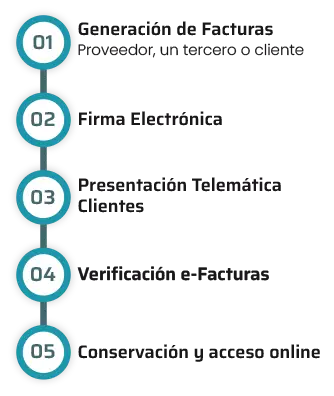
These are the high-level elements of the process.
Benefits
- Comply with the new legal requirements of the Electronic Invoicing regulations.
- Economic savings due to the elimination of printing and postage costs
- Guarantee of invoice delivery to the client and its traceability
- Reduction of the cycle from issuance to customer delivery
- Increased productivity of process stakeholders with consequent cost savings
- Improved client / supplier relationship
- Automatic accounting of issued invoices
- Electronic record of actions performed
- Direct interconnection with FACe and TicketBAI and Peppol.
Electronic Invoicing with easyei (easyap’s electronic invoicing platform)
The invoice issuance process does not vary; the only change is introduced in sending invoices to customers, delivering invoices to each customer in a legally valid electronic format accepted by their invoicing systems.
Let’s not forget that there isn’t a single valid e-invoice format; each client can opt for a different one, such as e-factura, EDI, UBL… and a specific delivery channel, from the simplest like email or FTP to web invoice or value-added networks like Face B2B, Peppol….
easyei users can upload invoices issued to their clients using one of the following methods:
- WEB Invoice manual entry of invoices directly into the easyei portal
- Automatic upload or import of structured files in standard formats such as XML, CSV, or Excel.
- Use of easyei’s invoice scanning function and validation of data automatically extracted by OCR.
- Upload of PDF files and validation of data automatically extracted by OCR.
- Custom formats subject to prior assessment by easyap.
All electronic formats allow for the simultaneous sending of e-invoices and electronically signed PDF invoices.
Clients can receive their invoices in the valid electronic format accepted by them via the following channels:
- Direct download from the easyei client portal
- email (delivery assurance and rejection management)
- FTP
- upload to their specific portals (via email or FTP)
- with custom interfaces subject to prior assessment by easyap.
The easyei client portal will facilitate compliance with new e-invoicing regulations by providing clients with invoices in legally valid formats and informing them of their status as per regulations.
Client Portal
As part of easyap’s e-invoicing solution, a customer web portal is included, designed so that the customer can resolve all inquiries typically directed to the accounts receivable department, as well as any other department of the company. The solution is based on digital transformation, automation and process implementation, highlighting the following points:
- Complete circuit: Client visibility into each invoice phase and status.
- Download invoices and duplicates.
- Possibility to manage attached invoice documentation.
- Management of all types of commercial documents, price lists, delivery notes ….
- Multi-channel, customer information system complemented by an incident management system.
- Possibility to automate contact data maintenance in the customer master.
- Bidirectional.
- 24×7.
- Training procedures and resolution of “FAQ”.
How does easyei work in invoice issuance?
Process
easyei is a web application designed to quickly and easily issue electronic invoices, complying with legal requirements to guarantee their validity. The steps that can be followed for electronic invoice issuance are described below.

1. Invoice Issuance:
Invoices are issued in the client’s accounting system/ERP without any changes (invoice printing not required).
Invoices are exported for transfer to the easyei portal (customizable format adaptable to each client).


2. Sending Invoices to easyei:
The generated invoices, with their attachments, are sent/uploaded to the easyei e-invoicing customer portal. Automatic collection from the accounting system by the easyei portal is also an option.
If desired, you can create your invoices directly on the portal via the Web.

3. Invoice Reception

4. Electronic Invoice Format per Client:
Configure the electronic invoice format you wish to use for each of your clients (Facturae, e-invoice, BRL, EDI, SAP, etc.).
Paper delivery is also supported.

5. Invoice Signing:
Invoices are signed either by the issuer or by the portal’s certificate.

6. Invoice Sending:
Invoices are sent to each of your clients in the agreed-upon format.
Sending accounting files in the format of major ERPs (SAP, JDE, Oracle, Navision, etc.) is also possible.

7. Acknowledgment of Receipt:
If desired, an acknowledgment of receipt is provided the moment the invoice is received by your client.

8. Invoice Status:
You can automatically ascertain if the client accepts or rejects the submitted invoice or if it has been properly received. As well as payment information.

9. Invoice Storage:
Invoices are securely stored in the easyaei portal and will be available for future reference by you or your clients for the agreed-upon period.
Clients can directly access invoices and/or their associated information and statuses.
“
Mutual benefit: satisfied clients and freed resources.
”

